Email privacy, simplified.
One identity. Infinite phantoms.
Create phantom email addresses that forward to your inbox. Reply without revealing who you are. Take control of your privacy.
How it works
A phantom for every service.
Each phantom is a unique email alias. Create them instantly, track who emails you, and cut off the ones you don't want.
- Unlimited phantoms
- Create as many addresses as you need. One for every newsletter, app, and signup.
- Anonymous replies
- Reply directly from your inbox. The sender never sees your real address.
- Sender tracking
- Know exactly where every email originates. Spot data leaks and unauthorized sharing.
- Instant blocking
- One click to silence unwanted senders. No unsubscribe hoops.
- Custom domains
- Bring your own domain for branded phantom addresses. Subdomains included.
- Breach tripwires
- Each phantom is a canary. When spam arrives, you know exactly which service leaked.
Fits your workflow
Everywhere you need a phantom.
In your browser, in a conversation, or alongside your code. Your email privacy comes with you.
Browser extension
A new signup.
A new phantom.Keep your real address out of the form. Generate a phantom and fill the email field, right where you’re signing up.
Get the extension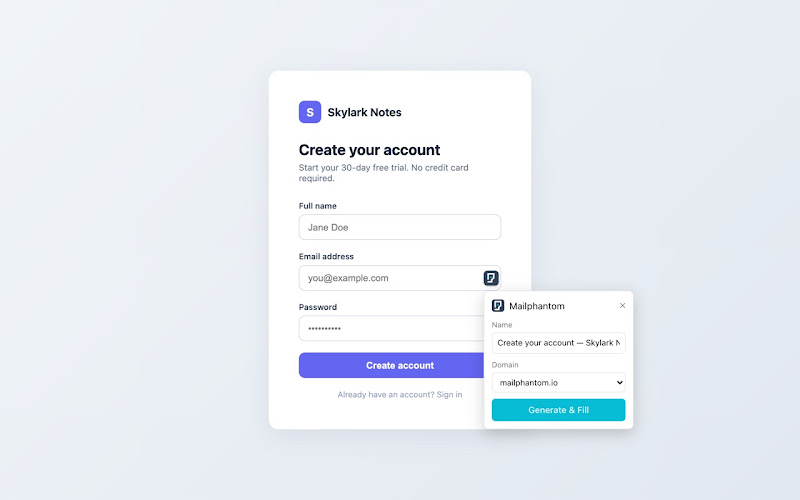
Mailphantom for ChatGPT
Your phantoms.
Just ask.Find an address, create a new phantom, or check its activity. Manage your aliases in a conversation with ChatGPT.
Open in ChatGPT ChatGPT Example conversation
Find my phantom for Skylark Notes.
 Mailphantom
Here’s your phantom for Skylark Notes.
Skylark Notes
Active
skylark.8f2k@mailphantom.io
Forwarding to your inbox.
How many emails has it received?
Mailphantom MCP
Privacy meets
your coding agent.Give your coding agent access to Mailphantom. Find and create aliases without stepping out of your development workflow.
Explore documentation~/projects/your-next-idea Mailphantom MCP connected
> Create a phantom for Skylark Notes.
✓ search_phantoms
✓ list_domains
✓ create_phantom
Phantom created. Ready to use.
skylark.8f2k@mailphantom.io
Forwarding to your inbox.
Smart Forwarding [BETA]
Only the emails you asked for.
Give your phantom an instruction. Matching emails reach your inbox. Emails that don’t match are skipped.
Your phantom
ember@phantom.xmpl
Your instruction
Only forward offers on coffee beans.
Account emails, receipts, and replies are always forwarded.
Emails for ember@phantom.xmpl. Instruction: “Only forward offers on coffee beans.”. 15% off your next bag, from offers@ember.xmpl. Your favourite coffee beans. Less to pay until Sunday. Forwarded: instruction matched. A better pour-over starts here, from offers@ember.xmpl. Save 20% on our gooseneck kettle this weekend. Skipped: instruction not matched. Thanks for your order, from orders@ember.xmpl. Order #1048 confirmed. Your coffee is on its way. Forwarded: account email. Account emails are forwarded without checking your instruction. Each email pauses briefly in the evaluation panel. Forwarded emails become read inbox rows and move down as newer messages arrive. Skipped emails shrink and fade in the panel. The incoming stream repeats continuously.
Pricing
No surprises. No upsells.
Try Basic free for 14 days. Cancel anytime.
Basic
Everyday privacy for your inbox.
$4.00
/ Month
Billed monthly
- Phantom email addresses
- Private replies
- Browser Plugin
Pro
Make your phantoms your own.
$6.00
/ Month
Billed monthly
- Everything in Basic
- Connect your own domains
- ChatGPT Plugin
- MCP
Teams
Email privacy for your team.
$8.00
/ Month
Per person · 5 people minimum
- Everything in Pro
- Team management and billing
- Priority support
Enterprise
Tailored to your business.
Custom pricing
- Everything in Pro
- Dedicated infrastructure
- Dedicated support
- Volume discounts & custom contracts
Your real email is nobody's business.
Start masking your email today with a free 14-day trial.